Hello. This is just a small blog post for me to rant and write about what I had to do properly configure pterodactyl panel on debian 13 with a reverse proxy(caddy).
Essentially, you need to follow this: debian installation guide for pterodactyl
Then follow this: downloading files
If you're using a server where the user is not root, you can enter into root shell using sudo -i
Here is the config I have set up for Caddy:
{
    servers :443 {
        timeouts {
            read_body 120s
        }
    }
}

notenlish.com {
    root * /var/www/notenlish
    file_server
}

# I have not yet setup forgejo instance
# git.notenlish.com {
#     reverse_proxy localhost:3000
# }

ptero-node.notenlish.com {
    reverse_proxy localhost:8080
}

# Replace the example <domain> with your domain name or IP address
panel.notenlish.com {
    root * /var/www/pterodactyl/public

    file_server

    php_fastcgi unix//run/php/php8.3-fpm.sock {
        root /var/www/pterodactyl/public
        index index.php

        env PHP_VALUE "upload_max_filesize = 100M
        post_max_size = 100M"
        env HTTP_PROXY ""
        env HTTPS "on"

        read_timeout 300s
        dial_timeout 300s
        write_timeout 300s
    }

    header Strict-Transport-Security "max-age=16768000; preload;"
    header X-Content-Type-Options "nosniff"
    header X-XSS-Protection "1; mode=block;"
    header X-Robots-Tag "none"
    header Content-Security-Policy "frame-ancestors 'self'"
    header X-Frame-Options "DENY"
    header Referrer-Policy "same-origin"

    request_body {
        max_size 100m
    }

    respond /.ht* 403

    log {
        output file /var/log/caddy/pterodactyl.log {
            roll_size 100MiB
            roll_keep_for 7d
        }
        level INFO
    }
}
Here is how I configured my DNS records on Cloudflare:

For some reason, you're supposed to set different ssl settings for the pterodactyl node and the pterodactyl config file.
Here is how I configured my pterodactyl node:
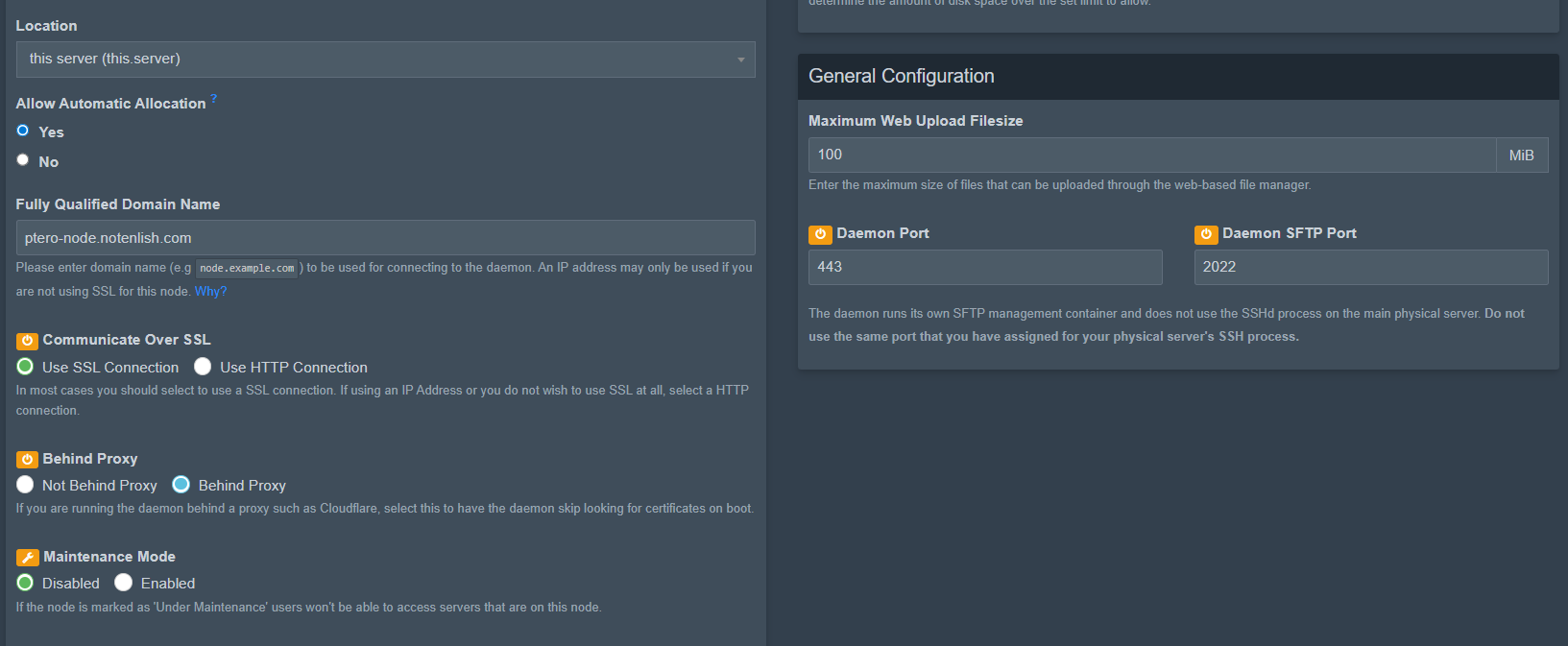
and here is the pterodactyl config.yml file:
debug: false
app_name: Pterodactyl
uuid: [redacted]
token_id: [redacted]
token: [redacted]
api:
  host: 0.0.0.0
  port: 8080
  ssl:
    enabled: false
    cert: /etc/letsencrypt/live/ptero-node.notenlish.com/fullchain.pem
    key: /etc/letsencrypt/live/ptero-node.notenlish.com/privkey.pem
  disable_remote_download: false
  upload_limit: 100
  trusted_proxies: []
system:
  root_directory: /var/lib/pterodactyl
  log_directory: /var/log/pterodactyl
  data: /var/lib/pterodactyl/volumes
  archive_directory: /var/lib/pterodactyl/archives
  backup_directory: /var/lib/pterodactyl/backups
  tmp_directory: /tmp/pterodactyl
  username: pterodactyl
  timezone: Etc/UTC
  user:
    rootless:
      enabled: false
      container_uid: 0
      container_gid: 0
    uid: 995
    gid: 985
  passwd:
    enabled: false
    directory: /run/wings/etc
  machine_id:
    enabled: true
    directory: /run/wings/machine-id
  disk_check_interval: 150
  activity_send_interval: 60
  activity_send_count: 100
  check_permissions_on_boot: true
  enable_log_rotate: true
  websocket_log_count: 150
  sftp:
    bind_address: 0.0.0.0
    bind_port: 2022
    read_only: false
  crash_detection:
    enabled: true
    detect_clean_exit_as_crash: true
    timeout: 60
  backups:
    write_limit: 0
    compression_level: best_speed
  transfers:
    download_limit: 0
  openat_mode: auto
docker:
  network:
    interface: 172.18.0.1
    dns:
    - 1.1.1.1
    - 1.0.0.1
    name: pterodactyl_nw
    ispn: false
    driver: bridge
    network_mode: pterodactyl_nw
    is_internal: false
    enable_icc: true
    network_mtu: 1500
    interfaces:
      v4:
        subnet: 172.18.0.0/16
        gateway: 172.18.0.1
      v6:
        subnet: fdba:17c8:6c94::/64
        gateway: fdba:17c8:6c94::1011
  domainname: ""
  registries: {}
  tmpfs_size: 100
  container_pid_limit: 512
  installer_limits:
    memory: 1024
    cpu: 100
  overhead:
    override: false
    default_multiplier: 1.05
    multipliers: {}
  use_performant_inspect: true
  userns_mode: ""
  log_config:
    type: local
    config:
      compress: "false"
      max-file: "1"
      max-size: 5m
      mode: non-blocking
throttles:
  enabled: true
  lines: 2000
  line_reset_interval: 100
remote: https://panel.notenlish.com
remote_query:
  timeout: 30
  boot_servers_per_page: 50
allowed_mounts: []
allowed_origins:
- https://panel.notenlish.com
allow_cors_private_network: false
ignore_panel_config_updates: false
Also big thanks to bricklou on the pterodactyl server. You saved me from a lot of frustration and I hope you have a wonderful day.